Failed and Rejected NMS Prescriptions
This section is applicable to Ontario pharmacies only.
The Pick Up/Delivery tile displays a red N next to prescriptions that have not been acknowledged by the NMS. Action must be taken by your pharmacy to resolve the issue. It is important to note that these prescriptions have already been adjudicated financially; it is the NMS transaction that remains outstanding. NMS provides a 365 day window in which to submit the outstanding transactions.
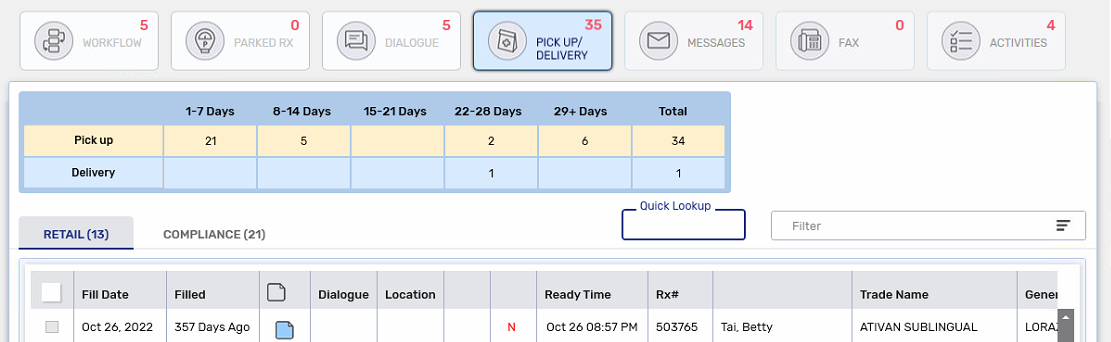
The N will appear beside the following existing indicator types if they apply to the prescription. It will appear alone if the prescription is not enrolled in these programs:
-
Auto Refill (A)
-
Inbound IVR (T)
Resubmitting a Failed or Rejected NMS Prescription
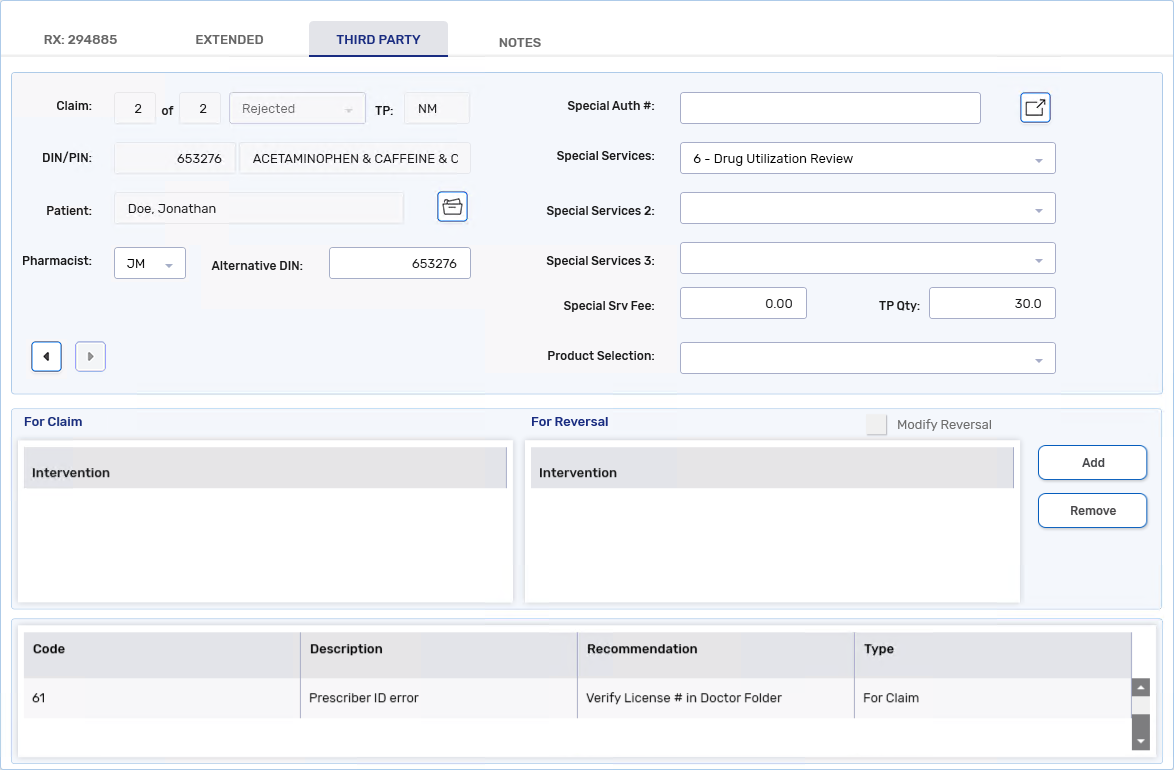
It is crucial that NMS transactions be completed. If there is an error when submitting an NMS claim, it will appear in the Rx Detail Third Party tab. Any issues must be fixed before resubmitting the transactions.
To resubmit an NMS prescription:
-
Select the Third Party tab in Rx Detail.
-
Review the response messages and take any necessary corrective action.
-
Select Submit.
Skipping the NMS Claim
In a network down scenario only will you be allowed to skip an NMS claim if it has failed. This allows you to move the prescription to the next Workflow step.
If an NMS submission is unsuccessful, the prescription will remain in the Data Entry queue until the submission is successful. The only exception to this is when the NMS claim is skipped in a network down scenario.
To skip an NMS claim:
-
Select the Third Party tab in Rx Detail.
-
Select Skip TP for the NMS claim. The prescription moves to the next Workflow step.
Rejected NMS Response Codes
NMS will only reject claims if they contain invalid or missing data (e.g., birth date, gender, Client ID, Prescriber ID, Prescriber Type, etc.). If you receive rejections from NMS but do not understand why, review the Ontario Drug Program Reference Manual for a complete list of possible rejections. If you need further assistance, contact the ODB Help Desk at 1-800-668-6641. Some common rejections are outlined below.
 NMS Response Code 35 - Cardholder Identity Error
A cardholder identity error means the patient's NMS Identity Code is incorrect or missing. Go to the Patient Folder Third Party tab and correct the Identity Code field.
NMS Response Code 32 - Client ID # Error
A Client ID error means the patient's NMS PHN/Identity # is incorrect or missing. Go to the Patient Folder Third Party tab and correct the PHN/Identity # field. The number must correspond to the selected Identity Code.

NMS Response Code 34 - Patient Date of Birth Error
As with any date of birth error returned by a Third Party, verify the patient's birth date has been entered correctly in the Patient Folder and make any corrections if it's wrong. If the birth date is correct and NMS continues to reject the claim, contact the ODB Help Desk at 1-800-668-6641.
NMS Response Code 76 - Pharmacist ID Code Error/Missing
NMS transactions are rejected with this response code if the pharmacist's initials are not selected from the Pharmacist field in the NMS claim. To correct this issue, select the on-duty pharmacist's initials from the Pharmacist dropdown list.
NMS Response Code 61 - Prescriber ID Error
A Prescriber ID error means the prescriber's license number is incorrect or missing. Go to the Prescriber Folder and correct the License # field.
For out of province prescribers, a standard License # for the licensing province must be used along with the Prescriber Type = Carrier Designated Out of Province ID. Refer to the Ontario Drug Programs Reference Manual for the license numbers you must use for out of province prescribers.
The MH intervention code can be used to bypass this error if you have confirmed the Prescriber Folder is set up correctly, and the prescriber is not licensed with the College of Physicians and Surgeons of Ontario (CPSO). If this code is used, ensure to document the rationale for its use.

NMS Response Code A8 - No reversal made/original claim missing
An original claim missing error can occur when you cancel a prescription that was not submitted successfully to NMS to begin with. NMS does not recognize prescription numbers that were not successfully transmitted to them. To prevent this error message, correctly submit the NMS claim before attempting to cancel it. Any NMS outstanding transactions where this response code was received will remain in Propel Rx until it is removed after 365 days.