PharmaSmart
This topic is intended for Rexall pharmacies only. This topic is not applicable to independent pharmacies.
The PharmaSmart program allows patients to link their PharmaSmart blood pressure cards to their Patient Folder in Propel Rx.
This provides the capability to upload the patient's blood pressure readings directly into the Clinical tab > Lab Results results section of the Patient Folder, allowing your pharmacy to provide additional patient-focused services based on these results.
PharmaSmart Enrollment
Enrolling in the PharmaSmart Program
Patients can be enrolled in the PharmaSmart program two ways:
-
From the Programs tab
-
When filling a prescription for a blood pressure medication
Use the dropdowns below to learn more information.
 PharmaSmart enrollment from the Programs tab
The patient can be enrolled into the PharmaSmart program from the Programs tab.
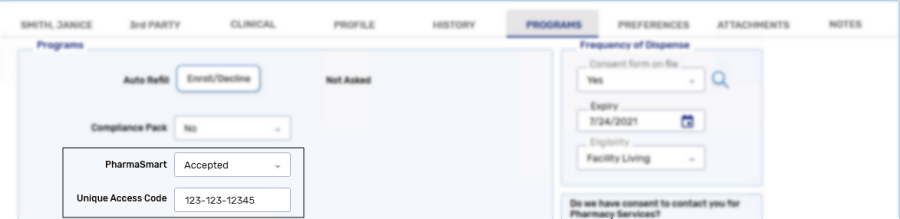
To enroll the patient:
-
Search for and select the patient.
-
Select the Programs tab.
-
From the PharmaSmart dropdown, select Accepted.
-
In the Unique Access Code field, enter the unique access code found on the PharmaSmart card.
-
Select Save.
PharmaSmart enrollment when processing a prescription
When processing a blood pressure medication prescription for a patient that has not been enrolled or declined the PharmaSmart program, a prompt displays to determine if the patient wants to enroll in the program.
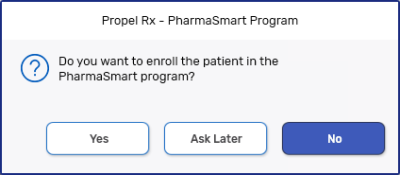
Select one of the following options:
-
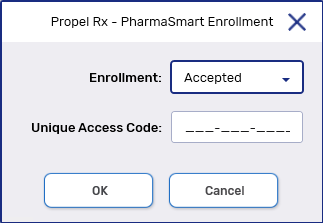
Yes - enrolls the patient in the PharmaSmart program. The PharmaSmart Enrollment window appears to enter in the Unique Access Code found on the PharmaSmart card.
-
Not Asked - patient is neither enrolled or declined from the program. The prompt will continue to display for all future prescriptions for blood pressure medications.
-
No - declines the patient from the program.
Opting out of the PharmaSmart Program
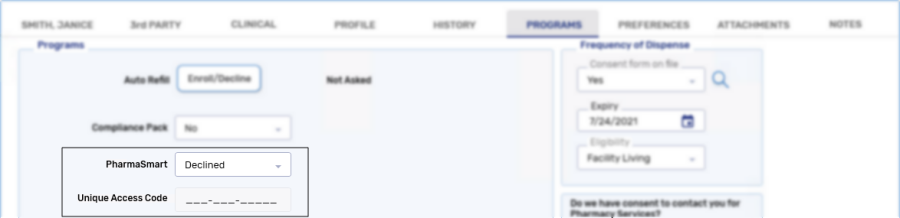
The patient may opt out of the PharmaSmart program at any time. To opt a patient out of the PharmaSmart program, from the PharmaSmart dropdown in the Programs tab, select Declined.