Declining Patients from Patient App
This topic is intended for Independent pharmacies only and is not applicable to Rexall pharmacies.
If a patient no longer wants to be enrolled in the Patient App program at your pharmacy, they can be declined from the program. Once declined, the patient can no longer view their (or their Person in Care's) prescription profile on the app.
A patient that has been declined from the Patient App program can still submit PhotoRx's to your pharmacy. These prescriptions will appear on the web-based Healthera Connect platform for you to review.
To remove a patient from the Patient App program:
-
Open the Patient Folder.
-
Select the Programs tab.
-
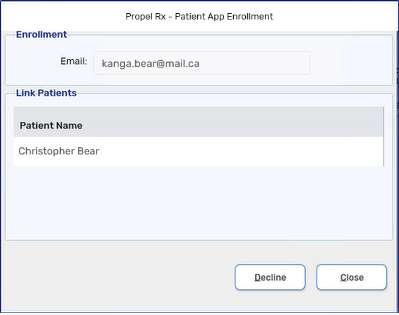
Next to the Patient App field, select Enroll/Decline. The Patient App Enrollment window opens.
-
Select Decline.
-
A message is transmitted to the app. If the message was successful, the enrollment status of the patient is changed to Declined.
-
If the patient was a Caregiver to a Person in Care, the Patient App enrollment status of the Person in Care remains unchanged.
-
The patient will no longer see their prescriptions from your pharmacy on the app.
-
If the patient was linked to more than one pharmacy, the link is only broken between the patient and your pharmacy. The patient can still manage their prescriptions from their other linked pharmacies.
-
The date and time that you unenrolled the patient is recorded in the Patient Folder History tab.
-