Resetting Inventory for a Drug
This topic is intended for Independent pharmacies only and is not applicable to Rexall pharmacies.
An inventory reset will do the following for the selected monitored product:
-
Zero out On Hand (Units) and On Hand (Packs).
-
Remove all Owe Balances and On Order amounts from any OPEN or SENT purchase orders.
-
Perform a manual adjustment out in the Product Usage view.
-
Update the values in the Order Grouping window, if the product is part of an Order Group.
-
Add a row to the Drug Folder History tab with a comment of whether shipments were retained or not.
-
Remove all shipment details if this option was chosen.
When inventory is reset, you can continue to monitor the product by re-entering the On Hand amount and verifying the order parameters or you can stop monitoring the product.
A Revert cannot undo an inventory reset.
To reset inventory for a monitored product:
-
Open the Drug Folder. the Inventory tab opens.
-
Highlight the pack size in the Packs Available section.
-
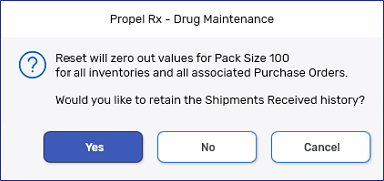
Select Reset. A prompt appears asking if the Shipments Received history should be retained.
-
Select Yes to retain the shipment history
-
Select No to remove the shipment history
-
Select Cancel to abort the reset
A record is added to the Drug Folder History tab listing the pack size that was reset and a comment of whether shipments were retained or not.
-