Batch Scanning Error Window
A window displays for error messages that occur during the Batch Scan process. See the table below for more information about each error.
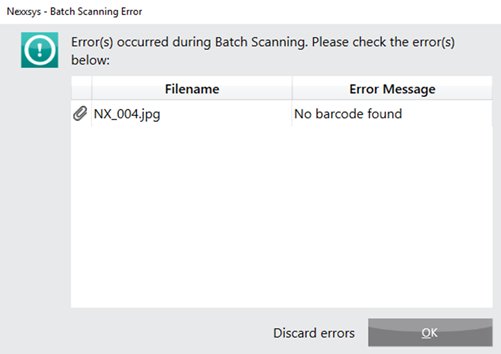
Select paperclip icon  beside the error to view and edit the attachment, if necessary. This opens the Preview window where the image can be edited or the prescription number the attachment corresponds to can be manually entered.
Selecting OK before all errors are reviewed will discard all scans with errors.
If a paper jam occurs, do not select Retry. Cancel the batch scan and start over, this will ensure no duplicate scans occur.
Table 1. Error Descriptions and Preventions or Resolutions
| Error Message | Description | Prevention or Resolution |
| No Barcode | Proper barcodes are not affixed to the document, are obstructed or was not scanned face down. | Ensure documents contain proper barcodes, they are unobstructed and are scanned face down. |
| Prescription record not found | Prescription has been removed from the profile or has a status of Amend Next. | Link the image to existing record using the previous Rx number or discard. |
| Barcode is invalid | A non-Rx barcode was attached to the document (i.e. POS or vial label bar code). | Ensure that only Nexxsys Rx bar coded documents are included in the batch. |
| Valid Front-Invalid Back Valid Back-Invalid Front (DUPLEX ONLY) | A non-Rx barcode was attached to the document (i.e. POS or vial label bar code). | Ensure that only Nexxsys Rx bar coded documents are included in the batch. |