Manually Extending a Prescription
When refilling certain prescriptions that have zero refills or a partial fill remaining, Nexxsys will not prompt to extend the prescription. These types of prescriptions include:
- Prescriptions for drugs that are not flagged as extendable.
- AutoFill prescription that appear on the To Do tab.
If these types of prescriptions need to be extended, the prescription must be manually extended from the Rx Detail screen.
To manually extend the prescription:
- Search for and select the patient.
- Select the Profile tab.
- Highlight the prescription(s) that require extension.
- Select Refill.

The Ready Time window appears. - Enter the appropriate Ready Time.
- Select OK. The Rx Detail window appears.
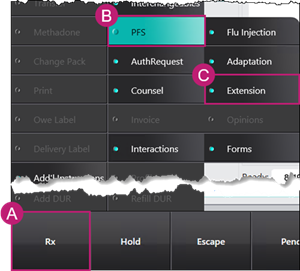
- Select Rx > PFS > Extension.
A prompt appears to confirm if the prescription should be extended.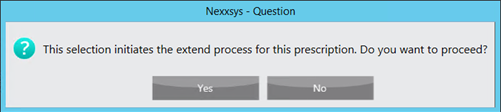
- Select Yes. The Rx Detail window is updated with the following information:
- Prescriber - updated to the pharmacist that is logged in at the time or is associated to the user logged in. If this is incorrect, the prescriber can be changed. For more information, see Doctor Change.
- QA - auto-populated based on the Qty of the previous fill. Pharmacists should use their discretion to determine if the QA should be changed.
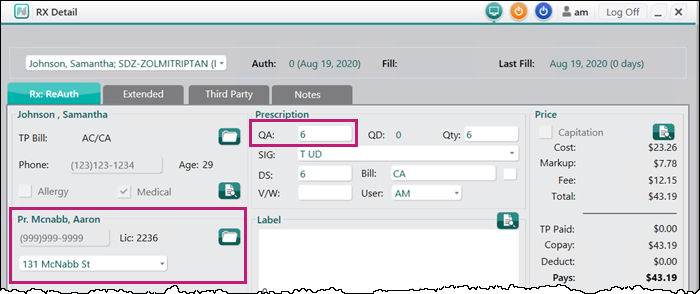
- Review all other information.
- Select Fill. The Extend Form window appears.
- In the Extend Form window, enter the following information:
- Service Type - mandatory in Alberta and Saskatchewan.
- Data - Optional.
- Assessment - mandatory in all provinces. Auto-populated with text that can be edited.
- Plan - mandatory in all provinces. Auto-populated with text that can be edited.
- Patient Consent - mandatory in all provinces. Automatically selected.
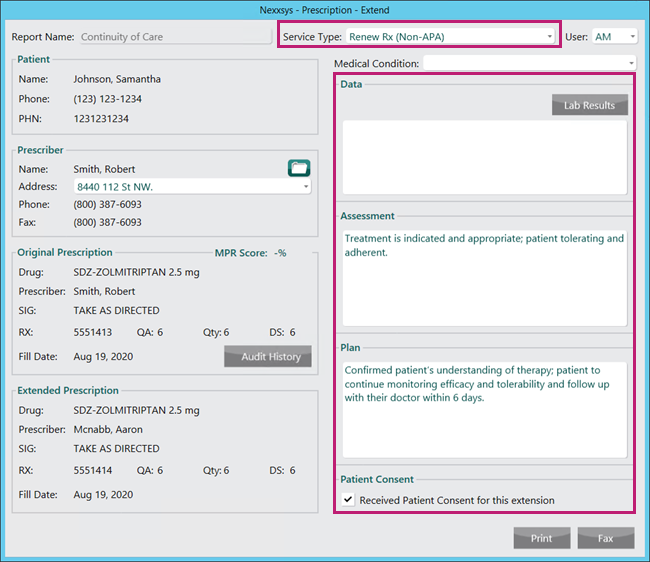
- Select Print or Fax.
- Print - prints the Notification of Prescription Adaptation Form that must be manually faxed to the prescriber.
- Fax - automatically faxes the Notification of Prescription Adaptation Form to the prescriber.
Once the extension is processed, the following occurs:
- The Notification of Prescription Adaptation Form is automatically attached to the extended prescription.
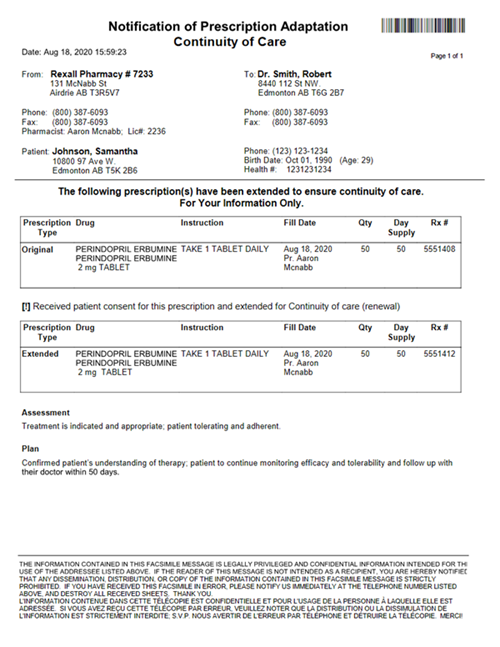
Note: The Notification of Prescription Adaptation Form can be manually attached to a patient folder using the barcode at the top of the form.
- A Clinical History Note is created based on the information added in the Extend Form window (step 11). To learn more information, see Clinical History.
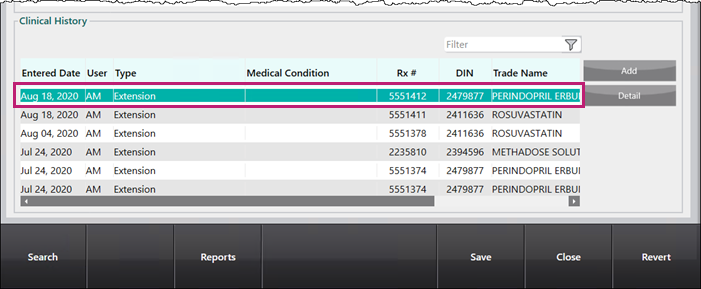
Note: Prescriptions that were extended prior to the Nexxsys 9.9 update (September 2020) will not have a Clinical History Note recorded. For these prescriptions, a note can be found in the History tab of the patient folder.
- In British Columbia, Alberta and Saskatchewan where a patient-focused service (PFS) prescription can be billed to the government plan, the PFS prescription is automatically billed. For more information, see Extension Fee for Service Prescriptions.