Correcting a PrescribeIT™ Prescription
The following prescription correct functionality have additional processes when correcting a PrescribeIT™ prescription:
- Refuse
- Rebill
- Amend
Use the dropdowns below to learn more about these processes.
 Refusing a PrescribeIT™ Prescription
To refuse a PrescribeIT™ prescription:
- Search for and select the patient.
- Select the Profile tab.
- Select the prescription to refuse.
- Select Correct > Refuse. A prompt displays to determine which action to take with the prescription.
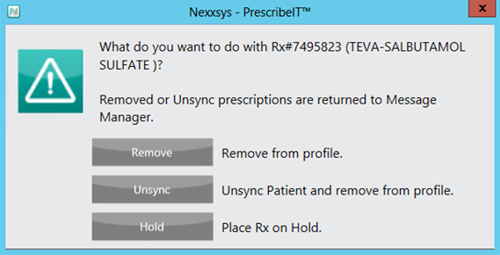
- Select one of the following options:
- Remove - patient remains synchronized. The prescription returns to the To Do tab for later processing. Available only for a new prescription that is being cancelled.
- Unsync - available for the first PrescribeIT™ prescription fill on a patient profile from a specific location. Unsynchronizes the patient from PrescribeIT™. The prescription is returned to the To Do tab. Available only for a new prescription that is being cancelled.
Note: If one or more PrescribeIT™ prescriptions are already processed on the patient profile, the Unsync option is not available.
- Hold - patient remains synchronized. The prescription is placed on hold. Only available for the first prescription associated to that EMR ID.
Once selected, the PrescribeIT™ - Cancel Notification Reason window appears.
- Select an appropriate reason.
- If Other is selected, a freeform text box opens to enter in a reason for refusal.
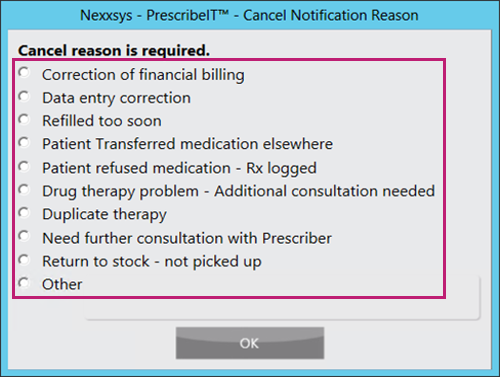
- Select OK. A Dispense Cancel Notification is sent to the prescriber and can be viewed in PrescribeIT™ .
Rebilling a PrescribeIT™ Prescription
A PrescribeIT™ prescription cannot be rebilled. When Correct > Rebill is selected for a PrescribeIT™ prescription, the following prompt displays:
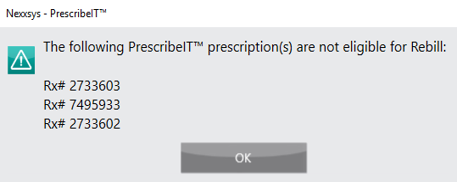
To correct a PrescribeIT™ prescription, the prescription must be refused with the appropriate Cancel Notification Reason selected and then re-processed. For more information, see Refusing a PrescribeIT™ Prescription.
Amending a PrescribeIT™ Prescription
A PrescribeIT™ prescription can be amended, however the SIG cannot be changed. Blister or dosett information and verbal or written information can be updated.
To change the SIG of a PrescribeIT™ prescription, the prescription must be refused with the appropriate Cancel Notification Reason selected and the re-processed. For more information, see Refusing a PrescribeIT™ Prescription.